📰 MalluPost
Community stories, news & updates
📲 Kuwait Sahel App Guide: How to Set It Up, Use Government Services & Fix Common Problems
If you live in Kuwait, Sahel is one of the most important government applications to have on your phone. Instead of visiting different government offices for every transaction, Sahel brings services from many Kuwait government entities into one application. But simply installing Sahel is not enough. The useful part is knowing what to check, where to find your transactions and notifications, how appointments work, and what to do when a service does not work as expected. This guide focuses on those practical things. 1. What is the Sahel app? Sahel is Kuwait's official unified government application for electronic services. It is designed for both citizens and residents. Through Sahel, government entities can provide electronic services, send notifications, show transaction information and provide other digital government functions. The exact services available can change as government entities add or modify their electronic services. For that reason, MalluKuwait does not maintain a fixed list claiming that every service will always be available. [ACTION] type=official label=Open Official Kuwait Sahel Information url=https://www.e.gov.kw/sites/kgoenglish/Pages/ApplicationPages/Application-Sahel.aspx [/ACTION] 2. Download the correct Sahel app Be careful when searching for government applications. Use the official Kuwait Government Online page or the verified application-store listing rather than downloading an APK or following an unknown WhatsApp link. The official Sahel application is provided by Kuwait's Public Authority for Civil Information. [ACTION] type=service label=Download Sahel from Official Kuwait Government Page url=https://www.e.gov.kw/sites/kgoenglish/Pages/ApplicationPages/Application-Sahel.aspx [/ACTION] 3. What can you do through Sahel? Sahel acts as a gateway between you and participating Kuwait government entities. Its official functions include areas such as: • Viewing government-related data and document status • Accessing electronic government services • Receiving official notifications and reminders • Tracking the status of requests and transactions • Paying fees where the particular service supports payment • Accessing government appointments • Viewing announcements from government entities Do not assume every ministry offers every transaction electronically. Open the relevant government entity inside Sahel and check the services currently available for your account. 4. Why notifications inside Sahel matter Do not treat Sahel notifications like ordinary promotional notifications. Government entities can use Sahel to send information related to services, requests and transactions. Make a habit of checking the Notifications area. A useful routine is: • Check new government notifications • Read the government entity name • Check whether action is required • Confirm the transaction inside Sahel • Avoid acting on suspicious external links claiming to be Sahel If you receive an SMS telling you to make an urgent government payment, do not automatically trust the link in the message. Open Sahel yourself and verify whether the transaction or payment actually exists. 5. Government appointments through Sahel Sahel includes access to government appointments through Kuwait's META central appointment platform. Where an appointment is required, check the relevant appointment service and available slots. Appointment availability can change. Do not rely on an old screenshot, social-media post or somebody else's appointment experience as proof that the same slots are available today. Always check the live system. 6. Check the status of your requests One major advantage of Sahel is that you may be able to track government requests electronically instead of repeatedly visiting an office. After submitting a service: • Keep note of what you submitted • Check the request status • Watch your Sahel notifications • Keep any transaction/reference information • Follow instructions issued by the responsible government entity If a request remains pending, first identify which government entity owns that transaction. Sahel is the platform, but the underlying service is provided by the relevant government authority. 7. A very useful new feature: My Numbers In August 2026, Kuwait's Communication and Information Technology Regulatory Authority — CITRA — launched the “My Numbers” service through Sahel. This is particularly useful for residents. The service allows citizens and residents to view mobile numbers and telecommunications services registered under their names with telecommunications companies in Kuwait. Why should you check this? Because a number registered under your identity that you do not recognize deserves attention. CITRA specifically encouraged users to review the numbers registered under their names to help ensure the accuracy and integrity of their personal information. [ACTION] type=official label=Read CITRA Official My Numbers Announcement url=https://www.citra.gov.kw/sites/en/Pages/NewsDetails.aspx?NewsID=123 [/ACTION] 8. What should you do after checking My Numbers? Review the displayed numbers carefully. If everything belongs to you, no action may be necessary. If you find a number or telecommunications service you do not recognize, do not ignore it. Contact the relevant telecommunications provider and, where necessary, use CITRA's official consumer channels for guidance. Do not send your Civil ID, OTP or banking information to somebody on social media claiming they can remove the number for you. 9. Sahel and Kuwait Mobile ID are different Sahel and Kuwait Mobile ID serve different purposes. Kuwait Mobile ID is your PACI-issued digital identity and authentication tool. Sahel is the unified government-services application. They work within Kuwait's broader digital-government ecosystem, so Mobile ID authentication may be relevant when accessing digital services. If you have problems with Kuwait Mobile ID itself, solve the Mobile ID issue rather than repeatedly reinstalling Sahel. 10. Sahel does not show the service I need This does not necessarily mean your account is broken. Possible reasons include: • The government entity does not currently provide that transaction through Sahel • The service has moved or changed • Your account is not eligible for that particular service • A prerequisite has not been completed • The underlying government record has not updated • The service may temporarily be unavailable First identify the responsible government entity. Then check its current services inside Sahel or its official government channel. Avoid following old YouTube videos step-by-step when the interface or government procedure has changed. 11. A transaction is still showing old information Sahel displays information supplied through government systems. If the underlying government record has not been updated, reinstalling Sahel may not solve the problem. For example, if the issue relates to Civil ID or residency information, first confirm that the relevant government process has actually been completed. Then check again after the government systems have updated. 12. Sahel login or authentication is failing Start with the basics: • Confirm your internet connection • Make sure Sahel is updated • Restart the application • Confirm your Civil ID information is current • Check whether Kuwait Mobile ID is working normally • Try again later if a government service appears temporarily unavailable If Mobile ID itself is the problem, use PACI's Mobile ID support process. If only one particular government service fails while the rest of Sahel works, the issue may belong to that government entity rather than Sahel generally. 13. Changed your phone? When moving to a new phone, make sure your Kuwait Mobile ID and other identity-related applications are correctly set up. Do not delete access from the old device until you understand what is required for transferring or re-registering your digital identity. Once your identity services are working correctly, install/update Sahel through the official application store and sign in through the supported process. 14. Sahel is useful for more than submitting applications Many people open Sahel only when they already need a government service. That misses part of its value. Use it periodically to check: • Notifications • Government request status • Document/status information • Appointments • Available services • Government announcements • My Numbers A quick check can sometimes reveal something that needs attention before it becomes urgent. 15. Be careful with fake Sahel payment messages Government-service popularity also makes familiar names attractive to scammers. Be suspicious of messages saying things such as: “Your Civil ID will be blocked.” “Pay immediately.” “Your Sahel account will expire.” “Update your bank details.” Do not enter payment-card information or identity credentials merely because a message contains a government logo. Instead: • Open Sahel directly • Check the actual notification or service • Verify the responsible government authority • Use official payment channels • Never share an OTP with another person 16. Keep your contact information current Government digital services work best when your identity and contact information are accurate. If your phone number or other important information changes, update it through the appropriate official process. Sahel updates have also introduced contact-information features, so keep the application current and check what options are presently available to your account. 17. English language availability Sahel supports English, but individual government service content can vary because services are supplied by different government entities. If a particular service remains difficult to understand, identify the responsible government authority and check whether it provides official English guidance. Do not guess the meaning of an important legal, residency or payment instruction. 18. Before paying anything through a government service Check: • The government entity • What service you are paying for • The amount displayed by the live system • The person/Civil ID/transaction involved • Whether the payment succeeded • Whether you received confirmation We deliberately do not publish fixed Sahel fees in this guide. Government fees depend on the service and can change. Use the amount shown by the official government system when completing the transaction. 19. Quick Sahel troubleshooting checklist Cannot log in? Check the app version, connection, Civil ID status and Mobile ID. Service missing? Check the relevant government entity and whether the service is currently available for you. Old information showing? Verify that the underlying government transaction has actually been completed. No appointment available? Check the live appointment system again later rather than relying on old availability information. Payment problem? Do not immediately pay twice. First verify whether the original transaction was completed. One government service fails but everything else works? The problem may be with that particular government service. Unknown telecom number under your name? Use My Numbers to identify it and contact the relevant telecom provider/CITRA through official channels. 20. A simple Sahel routine for Kuwait residents You do not need to open Sahel every day. But it is worth checking periodically and whenever you are dealing with an important government transaction. A simple routine: • Check notifications • Check pending requests • Check upcoming appointments • Review important document/status information • Check My Numbers occasionally • Keep Sahel and Mobile ID updated This turns Sahel from an app you remember only during an emergency into a useful part of managing life in Kuwait. Final advice Sahel is becoming an increasingly important gateway to Kuwait's digital government services. Use it as the starting point for government transactions, but remember that the actual service and underlying records belong to the relevant government entity. When something looks wrong, identify the responsible authority instead of repeatedly reinstalling the application. And whenever a message asks for money, identity information or an OTP, verify it inside the official application before doing anything. Government services and app features change over time. MalluKuwait recommends checking the live Sahel app and official Kuwait government sources before completing an important transaction. Official references: Kuwait Government Online, Sahel official application information and Kuwait Communication and Information Technology Regulatory Authority. Last verified: September 2026. Related Guides [RELATED] title=New to Kuwait? What to Do After You Arrive — A First-Time Expat Guide slug=new-to-kuwait-first-time-expat-guide [/RELATED] [RELATED] title=Kuwait Mobile ID Guide: How to Register, Update Your ID & Fix Common Problems slug=kuwait-mobile-id-register-update-problems-guide [/RELATED] [RELATED] title=Kuwait Civil ID Guide: Check Status, Collect Your Card & What to Do If It’s Delayed slug=kuwait-civil-id-guide-check-status-collect-card-delayed [/RELATED]
📱 Kuwait Mobile ID Guide: How to Register, Update Your ID & Fix Common Problems
Kuwait Mobile ID — commonly called Hawyti — is one of the most useful digital services to set up after becoming a resident of Kuwait. It gives you a PACI-issued digital identity on your smartphone and can be used for identity verification and authentication with supported government and private-sector services. This guide focuses on the practical questions: how to register, what a new resident should do before receiving the physical Civil ID, how to update Mobile ID after renewal, what to do if your PIN is locked, and what happens when you change or lose your phone. 1. What is Kuwait Mobile ID? Kuwait Mobile ID is the official mobile-based digital identity issued by Kuwait's Public Authority for Civil Information — PACI. Depending on your verification level and available services, Mobile ID can support: • Digital identity verification • Authentication to supported electronic services • Government credential wallet • QR-based verification • Sharing supported credentials • Digital signatures where the required verification level is enabled The credential wallet can also contain supported government-issued credentials. [ACTION] type=official label=Open Official Kuwait Mobile ID Website url=https://hawyti.paci.gov.kw/English/ [/ACTION] 2. Download Kuwait Mobile ID from the official source Do not install an application from a link sent through an unknown WhatsApp message, SMS or advertisement. Use PACI's official Mobile ID download page to reach the supported application stores. [ACTION] type=service label=Download Kuwait Mobile ID url=https://hawyti.paci.gov.kw/English/Download.aspx [/ACTION] 3. How to register Kuwait Mobile ID PACI's current mobile-registration process asks for information including: • Civil number • Civil ID card serial number or Mobile ID serial number • Passport number for non-Kuwaitis • Email address • Mobile number The app then uses identity verification, including a selfie and an OTP sent to the mobile number entered during registration. You will also create a PIN for your Mobile ID. Never give your OTP or Mobile ID PIN to another person. [ACTION] type=official label=See PACI Mobile ID Registration Steps url=https://hawyti.paci.gov.kw/English/Install.aspx [/ACTION] 4. New to Kuwait and still waiting for your physical Civil ID? This is particularly useful for new residents. PACI says new residents who are issuing their first Civil ID can obtain Kuwait Mobile ID even if they have not yet received the physical Civil ID card. For a first Civil ID application, PACI's registration instructions say to use the Mobile ID serial number received by SMS from PACI after the Civil ID issuance fee has been paid. That means you should not automatically assume you must wait until the plastic Civil ID card has been printed before checking whether Mobile ID registration is available to you. If you have only recently arrived in Kuwait, our complete newcomer guide explains the broader process: 5. Your Civil ID and Mobile ID are connected Mobile ID is derived from your Civil ID information. That makes PACI information important when your residency or Civil ID details change. If you are still dealing with Civil ID registration, collection, status or delays, use our detailed Civil ID guide: 6. How to update Mobile ID after your Civil ID changes Renewing your residency or Civil ID does not mean you should ignore the information displayed inside Mobile ID. PACI provides an update process for refreshing your Mobile ID data. According to PACI, you should first have submitted the relevant new Civil ID issuance request. The app may then show a renewal/update message. You can also go to the management area of Mobile ID and check for updates. When prompted, enter your Mobile ID PIN and complete the update. [ACTION] type=service label=See How to Update Mobile ID url=https://hawyti.paci.gov.kw/English/Update.aspx [/ACTION] 7. Mobile ID says it is not active If Mobile ID becomes inactive after your Civil ID expires, first make sure the underlying Civil ID/residency process has been completed correctly. PACI's current FAQ advises users who have renewed their Civil ID to use the update function in Mobile ID so that the digital identity can be refreshed. Do not repeatedly create new accounts simply because old information is showing. Check the underlying Civil ID status and then use the official update procedure. 8. Forgot or locked your Mobile ID PIN? The recovery method can depend on how your Mobile ID was originally enrolled. PACI's FAQ distinguishes between Mobile IDs enrolled through online registration and those enrolled using a kiosk or service centre. For online registration, PACI provides PIN reset/unlock options. For kiosk/service-centre enrollment, PACI may require the appropriate kiosk/service channel for PIN recovery. If the normal recovery option does not solve the problem, use PACI Mobile ID support rather than giving your details to an unofficial third party. [ACTION] type=service label=Open PACI Mobile ID Help & Support url=https://hawyti.paci.gov.kw/English/support.aspx [/ACTION] 9. Changing to a new phone Kuwait Mobile ID is not designed to have your identity active on multiple phones simultaneously. PACI says one Mobile ID can be issued on only one mobile device at a time. If you are intentionally changing phones, PACI advises cancelling Mobile ID on the old phone and registering on the new device. Do this while you still have access to the old phone whenever possible. 10. What if your phone is lost or stolen? If your phone containing Mobile ID is lost or stolen, act quickly. PACI says that if another phone is available, you can download the Mobile ID app and register again. Registering again on the new phone revokes the previously issued Mobile ID. Also follow the normal security steps for a lost phone, including securing your phone account, SIM and other sensitive applications. 11. Incorrect name, passport number or other information Do not assume that reinstalling Mobile ID will correct incorrect government data. If Mobile ID displays incorrect underlying personal information, the source data may need to be corrected through the responsible authority first. PACI's FAQ specifically advises users receiving incorrect-data errors to verify the underlying information with the Ministry of Interior. Once the underlying information and Civil ID issuance process have been corrected, Mobile ID can then be updated. 12. Authentication failed when using another service Sometimes Mobile ID itself is working but authentication fails while accessing a particular bank, ministry or other service. In that situation, the problem may be with the service you are trying to access rather than with your Mobile ID. PACI advises contacting the relevant service provider when authentication to that provider fails. This can save you from unnecessarily deleting or reinstalling a working Mobile ID. 13. Mobile ID verification levels matter Not every Mobile ID enrollment method provides exactly the same capabilities. PACI distinguishes between different verification levels. Mobile registration provides digital identity and authentication capabilities, while PACI's qualified verification level can enable stronger features such as digital signatures. If you specifically require digital-signature functionality, check PACI's current requirements rather than assuming normal mobile enrollment automatically provides every feature. 14. Mobile ID self-service kiosks PACI also maintains Mobile ID self-service kiosks. These can be relevant for qualified enrollment, digital-signature capability and certain PIN-related situations. Kiosk locations can change, so do not rely on an old social-media list. Check PACI's current kiosk-location page before travelling. [ACTION] type=map label=Check Current Mobile ID Kiosk Locations url=https://hawyti.paci.gov.kw/English/KioskLocations.aspx [/ACTION] 15. Can Mobile ID replace the physical Civil ID? PACI states that Kuwait Mobile ID is a legal digital identity issued and accredited by PACI and can be used as a digital identity in place of the physical Civil ID. However, keeping your physical Civil ID safe remains sensible because particular situations or processes may still require it. 16. What is the Credential Wallet? Kuwait Mobile ID includes a government credential-wallet framework. Depending on what is available for your account, supported credentials can be added and viewed through the wallet. PACI lists examples including government-issued credentials such as driving licences, birth certificates and vehicle registration information. The wallet also supports features such as QR verification and sharing for supported credentials. 17. Security rules worth remembering Your Mobile ID is an identity credential, not simply another phone application. • Never share your Mobile ID PIN. • Never share an OTP sent for Mobile ID registration or authentication. • Do not approve an authentication request you did not initiate. • Install Mobile ID only through official application-store links. • Secure your phone with a strong screen lock. • If your phone is lost, take action quickly. • Do not send sensitive identity information to strangers claiming they can “fix” Mobile ID. • Use PACI support when you cannot resolve an account problem. 18. Quick troubleshooting checklist Mobile ID not updating? Check whether the underlying Civil ID issuance or renewal process has been completed, then use Mobile ID's update function. Forgot PIN? Use the official recovery method appropriate to your enrollment type. Changed phone? Cancel Mobile ID on the old phone when possible and register on the new phone. Lost phone? Register Mobile ID on another available phone and secure your lost device and SIM. Incorrect personal data? Correct the underlying government information first rather than repeatedly reinstalling Mobile ID. Authentication fails only with one service? Contact that particular service provider. Still cannot solve the problem? Use PACI's official Mobile ID support. [ACTION] type=service label=Contact Kuwait Mobile ID Support url=https://hawyti.paci.gov.kw/English/support.aspx [/ACTION] Final advice For many residents, Kuwait Mobile ID becomes one of the most useful applications on the phone. Set it up carefully, keep the PIN private and make sure the information remains updated after changes to your residency or Civil ID. For a new resident, Mobile ID should be viewed as part of a bigger setup process — residency, Civil ID, Mobile ID, Sahel, banking and other essential services all connect together. Government applications, procedures and available features can change. Always check PACI's current instructions before completing an important identity transaction. Official reference: Public Authority for Civil Information — Kuwait Mobile ID. Last verified: September 2026. Related Guides [RELATED] title=New to Kuwait? What to Do After You Arrive — A First-Time Expat Guide slug=new-to-kuwait-first-time-expat-guide [/RELATED] [RELATED] title=Kuwait Civil ID Guide: Check Status, Collect Your Card & What to Do If It’s Delayed slug=kuwait-civil-id-guide-check-status-collect-card-delayed [/RELATED]
🇰🇼 New to Kuwait? What to Do After You Arrive — A First-Time Expat Guide
Arriving in Kuwait for the first time can be confusing. You may have your passport, visa and employer details, but still have questions such as: What happens after I land? When do I do my medical? When do I get residency? How do I get a Civil ID? When can I use Kuwait Mobile ID? This guide gives you a practical roadmap for your first weeks in Kuwait. Important: There is no single identical process for every newcomer. Your steps depend on your residency category, sponsor and reason for coming to Kuwait. An Article 18 employee, Article 22 dependant and Article 20 domestic worker may have different procedures. 1. Before leaving Kuwait Airport Keep your passport and entry documents safely with you. Make sure you also have your employer, sponsor or receiving person's contact information and know where you are going after leaving the airport. Do not throw away or lose documents connected with your entry to Kuwait. Some information may be needed during your residency process. First-day essentials • Passport and entry documents • Employer or sponsor contact details • Kuwait accommodation address if available • Important employment documents • Copies or secure digital copies of important documents • Emergency contact details 2. Get a Kuwait mobile number A local mobile number quickly becomes useful in Kuwait. Government services, banks and other services commonly use mobile numbers for notifications or verification. When obtaining a SIM, use your own valid identification and keep the number registered correctly. 3. Speak to your employer or sponsor before starting government procedures yourself If you arrived for employment, your employer or sponsor may coordinate important parts of your residency procedure. Ask them what has already been arranged and what you personally need to attend. This can prevent duplicated appointments, unnecessary payments or visiting the wrong office. Important: Your exact sequence can differ depending on residency category. Follow the instructions applicable to your own sponsorship and residency type. 4. Complete the required expatriate medical examination New expatriate workers may need medical examinations as part of obtaining legal residency. The official Kuwait Government service states that the expatriate must attend the expatriate labour examination centre personally for the required examination. The examination is used to establish the required health clearance for residency. [ACTION] type=official label=Check Official Expatriate Medical Examination url=https://www.e.gov.kw/sites/kgoenglish/Pages/Services/MOH/ExaminationForeignWorkers.aspx [/ACTION] There is also an official government service for requesting an expatriate medical-examination appointment. [ACTION] type=service label=Check Medical Examination Appointment Service url=https://www.e.gov.kw/sites/kgoenglish/Pages/eServices/MOH/ForeignersCheckup.aspx [/ACTION] Before going, check the current official document requirements and appointment instructions rather than relying on an old checklist shared online. 5. Complete fingerprint or security procedures when required Depending on your residency procedure and current government requirements, you may also be instructed to complete fingerprinting or other security procedures. Follow the instructions given for your particular residency application. Do not assume another person's procedure is identical to yours. 6. Complete health insurance when required Health insurance is an important part of many residency procedures. Do not rely on an old insurance price quoted online because government charges and rules can change. Check the current amount and procedure through the official service at the time you complete the transaction. If you need the full explanation, read the MalluKuwait guide: [RELATED] title=Kuwait Health Insurance for Expats: How to Pay, Renew & Use It for Residency slug=kuwait-health-insurance-expats-renewal-residency-guide [/RELATED] 7. Complete your first residency Your residence permit is one of the major milestones after arriving in Kuwait. For example, the Ministry of Interior's first Article 18 work-residency procedure lists requirements including the original work-entry visa, passport, work permit, health clearance, criminal-record requirements and health-insurance certificate. Your employer or sponsor may handle or coordinate parts of this process. [ACTION] type=official label=Check Official MOI Residency Services url=https://www.moi.gov.kw/main/eservices/residence [/ACTION] Important: Do not use the Article 18 checklist if you hold a different residency category. Check the MOI requirements applicable to your own case. 8. Register for your Civil ID Once the relevant residency stage is complete, Civil ID registration becomes one of the most important next steps. PACI currently provides first-registration procedures for non-Kuwaiti residents including Articles 17, 18, 19, 23 and 24 through its electronic services or Sahel. The PACI requirements can include a valid passport, photograph, accommodation documentation and residency information depending on the case. Your Kuwait address matters here, so keep proper accommodation documentation. [ACTION] type=official label=Check PACI First-Time Registration Guide url=https://services.paci.gov.kw/applications-guide/detail/first-time-registration-of-a-non-kuwaiti-%28article-17%2F18%2F19%2F23%2F24-%29/48 [/ACTION] Need more help? Read the [RELATED] title=Kuwait Civil ID Guide: Check Status, Collect Your Card & What to Do If It’s Delayed slug=kuwait-civil-id-guide-check-status-collect-card-delayed [/RELATED] 9. Set up Kuwait Mobile ID Kuwait Mobile ID — Hawyti — is extremely useful once your identity information is available. PACI specifically supports new residents who are issuing their first Civil ID. For first-time Civil ID applicants, PACI explains how the Mobile ID serial number received during the Civil ID process can be used for Mobile ID enrollment. [ACTION] type=official label=Official Kuwait Mobile ID Setup Guide url=https://hawyti.paci.gov.kw/English/Install.aspx [/ACTION] Keep your Mobile ID PIN private and never share verification codes with another person. 10. Set up Sahel Sahel brings many Kuwait government services and notifications together. Once you are eligible and your identity setup is ready, installing and activating Sahel can make everyday government transactions considerably easier. Use only the genuine application from the official mobile-app stores and never provide your login or verification information through a link sent by a stranger. 11. Open your bank or salary account If you came to Kuwait for work, your employer may tell you which documents are needed for your salary account. Bank requirements can differ, so check directly with the bank instead of relying on a universal document list. Your Civil ID, Mobile ID and completed residency process will make many everyday financial and identification procedures easier. 12. Sort out your accommodation and address properly Your Kuwait address is more than somewhere to sleep. Accommodation documentation can be relevant when registering your Civil ID with PACI. Keep copies of the appropriate tenancy or accommodation documents and make sure your official address information is correct. 13. Do not rush to buy a car immediately During your first days, learn your work location, accommodation area and daily travel pattern. Use available transport while you understand how far you actually need to travel. If you later decide to buy a used vehicle, MalluKuwait already has a detailed guide: [RELATED] title=Buying a Used Car in Kuwait: 7 Things to Check Before Paying slug=buying-used-car-kuwait-7-things-check-before-paying [/RELATED] 14. Save Kuwait's emergency number Save this number immediately: 112 — Police, Ambulance and Fire In a genuine emergency, call 112. Do not wait until an emergency happens before learning the number. 15. Your first-month Kuwait checklist Use this as a simple progress list. • Kuwait SIM/mobile number ready • Employer or sponsor instructions confirmed • Required medical examination completed • Required fingerprint/security procedure completed where applicable • Health insurance completed where required • Residency completed • Civil ID registration submitted • Kuwait Mobile ID activated when eligible • Sahel activated when eligible • Bank/salary account arranged • Correct accommodation/address documentation kept • 112 saved for emergencies • Passport and important documents stored safely A final piece of advice Do not panic if another new arrival completes a particular step before you. Kuwait procedures differ according to residency category, employer, sponsor and individual circumstances. Use your employer or sponsor for the parts they are responsible for, and verify important government procedures through the relevant official authority rather than relying only on old social-media posts or forwarded messages. Important: Government procedures, eligibility rules, required documents and online services can change. Always verify the latest requirements through the relevant Kuwait government authority before completing a transaction. Official references: Kuwait Ministry of Interior, Public Authority for Civil Information and Kuwait Government Online / Ministry of Health. Last verified: September 2026.

🏥 Kuwait Health Insurance for Expats: How to Pay, Renew & Use It for Residency
Health insurance is one of the practical steps many expatriates in Kuwait need to complete before or during residency-related procedures. The important thing is not just knowing that insurance exists. You need to know when to do it, what to check before paying, how it connects with residency renewal, and what to do if something does not update correctly. This guide focuses on those practical steps. 1. Understand why health insurance matters for residency For common expatriate residency categories, health insurance forms part of the documents or records required for residency procedures. For example, residency-renewal requirements for common categories such as private-sector employees and family dependants include proof of valid health insurance. This means insurance should normally be handled before trying to complete the final residency-renewal step. [ACTION] type=official label=Check Kuwait Residency Services — MOI url=https://www.moi.gov.kw/main/eservices/residence [/ACTION] 2. Do not rely on an old insurance fee shown online Health-insurance fees can change and may depend on your residency category and current government rules. For that reason, MalluKuwait does not recommend relying on an old fee table or an amount quoted in an older online guide. The safer approach is to check the amount presented by the official government health-insurance service for your own transaction immediately before payment. Important: If the amount shown in the official payment system is different from an older website or article, use the current official system amount applicable to your Civil ID or residency category. 3. Check the official health-insurance service first Before starting, make sure you are using an official Kuwait government or Ministry of Health service. Do not make insurance payments through unknown links sent through social media, WhatsApp messages or unofficial websites. [ACTION] type=official label=Check Official Kuwait Health Insurance Service url=https://e.gov.kw/sites/kgoenglish/Pages/Services/MOH/IssuingHealthInsuranceCards.aspx [/ACTION] 4. What information should you keep ready? The exact requirements can differ depending on the residency category and transaction, but it is useful to keep your basic residency information ready before starting. Before you begin • Keep your Civil Number available. • Keep your passport details available. • Know your residency category. • Make sure your personal information matches official records. • Use an official government service for the insurance procedure. • Keep proof of payment or confirmation after completing the transaction. 5. Insurance payment and residency renewal are not the same thing Paying or renewing health insurance does not itself renew your residency. Health insurance is one requirement used as part of the residency process. After the health-insurance step is complete, you still need to complete the applicable residency-renewal procedure through the Ministry of Interior or the relevant government service. [ACTION] type=service label=Open MOI Residency Renewal Services url=https://www.moi.gov.kw/main/eservices/residence [/ACTION] 6. What if insurance is paid but residency renewal still does not proceed? If you have completed the insurance step but the residency system does not recognise it immediately, do not keep paying again. First check whether the payment was successfully completed and keep the transaction confirmation. Then allow reasonable time for government systems to update if the service indicates that processing is not instant. If the issue continues, verify the insurance status through the official channel and contact the appropriate authority before attempting another payment. What to check • Did the payment complete successfully? • Did you receive a transaction confirmation? • Is your Civil Number correct? • Is the insurance linked to the correct residency category? • Has the system had time to update? • Is another residency requirement still missing? 7. What if your residency category changes? A change in residency type can affect the steps or requirements you need to follow. For example, a person moving between employment, dependant or other residency categories should not assume that the exact same insurance process or requirement will apply. Check the official residency service for your new category before completing the insurance step. [ACTION] type=official label=Check Residency Category Requirements url=https://www.moi.gov.kw/main/eservices/residence [/ACTION] 8. Avoid these common mistakes • Paying through an unofficial link. • Using an old insurance fee from a previous year. • Entering incorrect Civil ID or passport information. • Paying twice because the system has not updated immediately. • Assuming insurance payment automatically renews residency. • Starting residency renewal without checking whether the insurance requirement is complete. • Ignoring differences between residency categories. 9. Before you complete the insurance payment Use this quick checklist. • Confirm you are using an official government service. • Check that your Civil Number and personal details are correct. • Confirm your residency category. • Check the current amount shown by the official system. • Complete the payment only once. • Save the payment confirmation. • Continue with the applicable residency-renewal process afterward. Important: Health-insurance rules, fees, procedures and residency requirements can change. Always check the current information shown by the official Kuwait government, Ministry of Health or Ministry of Interior service before making a payment or completing a residency transaction. Official references: Kuwait Ministry of Interior residency services and Kuwait Government Online / Ministry of Health health-insurance service information. Last verified: September 2026.
🪪 Kuwait Civil ID Guide: Check Status, Collect Your Card & What to Do If It’s Delayed
Your Civil ID is one of the documents you will use most often while living in Kuwait. But when you are waiting for a new or renewed card, the useful questions are usually simple: Is the card ready? Where do I collect it? Should I travel to PACI now? And what can I use while I am waiting? This guide focuses on those practical steps. 1. Check whether your Civil ID is actually ready Before travelling anywhere, check the status of your card through the official Public Authority for Civil Information service. [ACTION] type=status label=Check Civil ID Status — PACI url=https://services.paci.gov.kw/card/inquiry?lang=en [/ACTION] PACI also provides official services for checking Civil ID validity, renewal and related card matters. Checking the current status before leaving home can save you an unnecessary trip. 2. Check where your card should be collected Do not automatically travel to South Surra simply because it is PACI's main headquarters. First confirm the collection information given for your own card or transaction. If your card has been assigned to PACI Headquarters in South Surra, use this location. [LOCATION] title=PACI Headquarters — South Surra address=South Surra / Zahra, Kuwait map=https://www.google.com/maps/search/?api=1&query=Public+Authority+for+Civil+Information+South+Surra+Kuwait [/LOCATION] Before you go • Confirm that your Civil ID is actually ready. • Confirm the collection location. • Check PACI's current collection timings. • Carry the identification or documents required for your case. • Allow enough time for parking and collection. 3. Check today's collection timings before travelling PACI publishes its current branch and service timings through its official channels. Government timings can change during Ramadan, public holidays or administrative changes, so checking on the day you travel is better than relying on an old timetable. [ACTION] type=official label=Check PACI Branches & Current Timings url=https://services.paci.gov.kw/contact-us [/ACTION] PACI's official contact number is 1889988. 4. South Surra is not the only PACI service location PACI operates several service locations. Depending on the service, locations can include South Surra, Ahmadi / South Subahiya, Jahra, Liberation Tower and government-mall facilities. The practical rule is simple: check the location relevant to your own card or transaction before travelling. 5. Physical Civil ID not ready? Check Kuwait Mobile ID Kuwait Mobile ID provides an official digital identity on your phone. PACI provides official enrollment instructions for citizens and residents, including first-time Civil ID applicants. [ACTION] type=service label=Set Up Kuwait Mobile ID — Official Guide url=https://hawyti.paci.gov.kw/English/Install.aspx [/ACTION] Mobile ID can be particularly useful while waiting for the physical card, although you should confirm whether the organisation or transaction you are dealing with accepts the digital credential. 6. What should you do if the Civil ID seems delayed? Repeated trips to PACI without first checking the status may waste your time. Use this order: • Check the official PACI Card Status service. • Confirm whether the physical card has been issued or is ready. • Check Kuwait Mobile ID. • Contact PACI if the status remains unclear. • Visit a PACI service centre when PACI or the procedure requires you to attend. [ACTION] type=official label=Contact PACI url=https://services.paci.gov.kw/contact-us [/ACTION] 7. Need to pay Civil ID fees? Use PACI's official payment service rather than payment links sent through unknown messages or unofficial websites. [ACTION] type=service label=Check & Pay Civil ID Fees — PACI url=https://services.paci.gov.kw/card/payment?lang=en [/ACTION] Quick Civil ID checklist • Check your Civil ID status before leaving home. • Confirm the correct collection location. • Check current collection timings. • Keep your Civil Number available. • Use official PACI services for status and payment. • Check Kuwait Mobile ID when useful. • Contact PACI if something is unclear. Important: PACI procedures, locations, timings, fees and digital services can change. Always verify current information through official PACI services before travelling or making a payment. Official references: Public Authority for Civil Information (PACI) card services, PACI service-centre information and Kuwait Mobile ID. Last verified: September 2026.
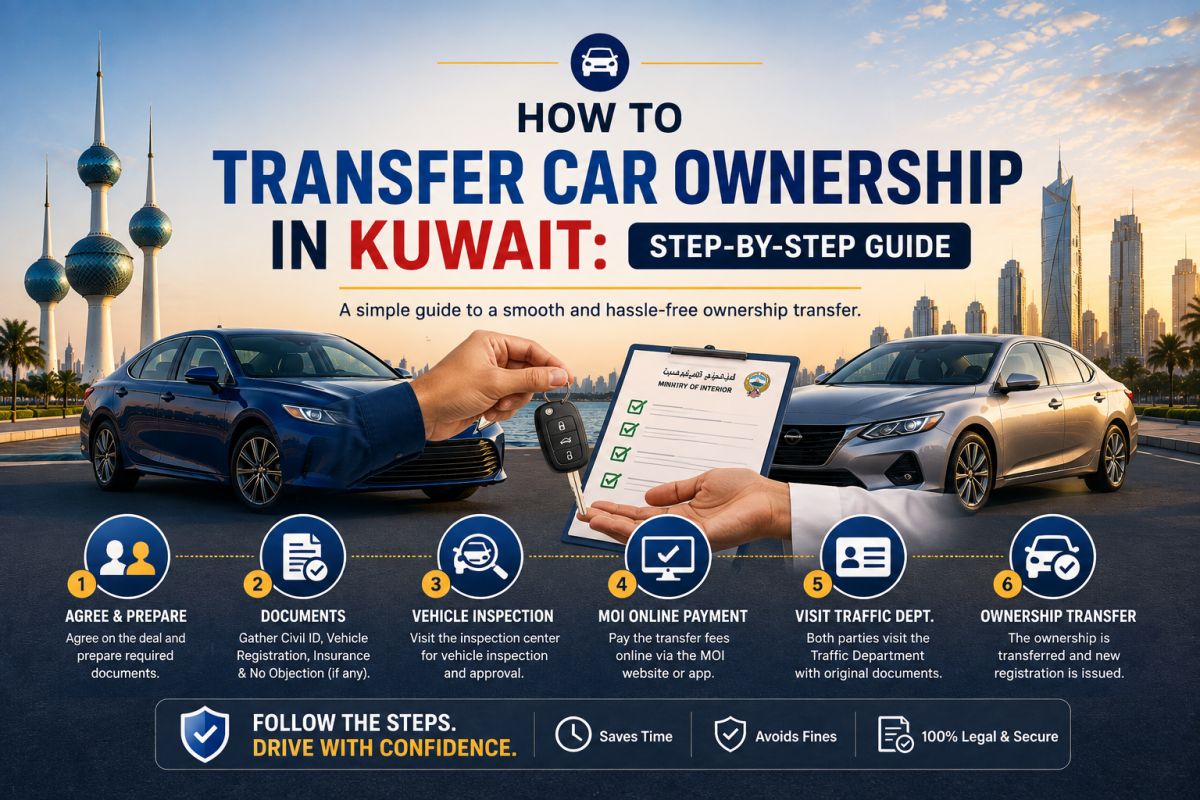
🚗 How to Transfer Car Ownership in Kuwait: Step-by-Step Guide
Once a buyer and seller agree on a vehicle in Kuwait, the deal is not complete until ownership is formally transferred. Handling this step properly protects both sides and ensures the vehicle is registered to the correct owner. Kuwait's Ministry of Interior provides vehicle ownership-transfer services through the General Department of Traffic, and an electronic vehicle-transfer service is also available through the Sahel government application. Option 1: Transfer vehicle ownership through Sahel The Ministry of Interior has introduced electronic vehicle ownership transfer through the Sahel application for eligible transactions. Step 1: Seller starts the request The seller opens Sahel and goes to Ministry of Interior services, then Traffic Services and Vehicle Ownership Transfer. The seller selects the vehicle and enters the new owner's Civil ID number. Step 2: Buyer receives the request The buyer receives a notification, reviews the ownership-transfer request and approves the required procedure. Step 3: Complete the insurance-transfer requirement As part of the digital process, the buyer completes the applicable vehicle-insurance transfer step and associated requirement shown through the service. Step 4: Seller confirms payment The seller receives the next notification and confirms the required payment/transaction information before completing the ownership-transfer stage. Step 5: Buyer receives the new vehicle licence After completion, the buyer can access the newly transferred electronic vehicle licence and add the updated licence to the digital wallet through the applicable government application. Traditional ownership-transfer requirements The Ministry of Interior also publishes the underlying vehicle-transfer procedure. The listed requirements include transferring the insurance document from the old owner to the new owner, seller and buyer identification, the vehicle registration booklet and ensuring applicable financial penalties have been settled. For transactions that cannot be completed through the digital process, additional attendance or documentation may therefore be required. What should the buyer prepare? • Valid Civil ID. • Correct Civil ID details for the transaction. • Required vehicle insurance arrangements. • Agreed payment method and proof where applicable. • Access to Sahel and the relevant Kuwait digital-government services where the digital method is being used. What should the seller prepare? • Vehicle registration information. • Valid Civil ID. • The vehicle being transferred must correspond with the registration records. • Any outstanding requirements or fines should be resolved. • Required confirmations inside the Sahel transfer process when using the digital service. Do not pay and postpone the transfer From a buyer's perspective, the safest approach is to treat payment and ownership transfer as connected parts of the same transaction. Avoid paying the full amount and then agreeing to complete the transfer several days later unless there is a clear, legitimate reason and you fully understand the risk. Check the vehicle before reaching the transfer stage Ownership transfer only confirms who owns the vehicle. It does not mean the vehicle is mechanically sound. Before completing the purchase, inspect the car, verify the registration details, check for major accident repairs and arrange a professional mechanical inspection when appropriate. What if the normal digital transfer does not work? Some transactions can involve circumstances that require additional documentation or direct assistance from the General Department of Traffic. If Sahel does not allow the transaction to proceed, do not try to bypass the process. Confirm the required procedure with the Ministry of Interior. Final checklist • Buyer and seller have agreed on the final price. • The vehicle has been inspected. • Registration information matches the vehicle. • Insurance requirements are ready. • Any applicable fines or restrictions are resolved. • Payment and transfer are coordinated safely. • The buyer confirms the new vehicle licence after completion. Important: Government procedures and digital services can change. Check the latest instructions in Sahel or directly through Kuwait's Ministry of Interior before completing a vehicle transaction. Official references: Kuwait Ministry of Interior — General Department of Traffic vehicle ownership-transfer procedures and Sahel vehicle ownership-transfer service.

🚗 Buying a Car in Kuwait: New vs Used — Which Makes More Sense?
One of the first decisions when buying a car in Kuwait is whether to buy new or used. There is no single answer that is correct for everyone. The better choice depends on your budget, how long you expect to keep the car, how much uncertainty you are comfortable with and how important warranty coverage is to you. Here is a practical way to compare the two choices. New car: the main advantages The biggest advantage of a new vehicle is predictability. You know its history from day one, there is no previous owner, and manufacturer or dealer warranty coverage can reduce the risk of unexpected repair costs during the early years. A new car can make particular sense if you intend to keep it for a long period. The initial depreciation becomes less important when the purchase cost is spread over many years of ownership. You may also get newer safety equipment, updated infotainment, improved fuel efficiency and access to current dealer finance or service packages. New car: the main disadvantages The largest disadvantage is usually price and depreciation. A new vehicle generally loses part of its value once it enters the used market. Higher purchase prices can also mean a larger down payment or monthly commitment. Depending on the vehicle, insurance and dealer servicing may also cost more. Used car: the main advantages A used vehicle can offer significantly more car for the same budget. Instead of buying an entry-level new model, the same amount may buy a better-equipped or larger vehicle that is a few years old. The previous owner has also absorbed some of the early depreciation. If you choose a popular model with a strong Kuwait resale market, you may be able to sell it later without taking the same percentage loss as the first owner. Used car: the main disadvantages The unknown history is the major risk. Poor maintenance, accident damage, overheating, transmission problems and delayed repairs may not be obvious during a quick viewing. This is why a proper pre-purchase inspection matters. The money saved on the purchase price can disappear quickly if the vehicle immediately needs tyres, suspension work, AC repairs or major mechanical work. Think about Kuwait's climate Kuwait's heat places considerable demand on batteries, cooling systems and air conditioning. When comparing two used vehicles, service history and cooling-system condition can sometimes matter more than small differences in mileage. For a new vehicle, warranty coverage provides additional reassurance during these early years. For a used vehicle, reserve part of your purchase budget for initial maintenance rather than spending every dinar on the purchase price itself. Consider parts availability and workshop support A low purchase price does not automatically mean low ownership cost. Before choosing a model, consider how easily spare parts are available in Kuwait, how many workshops know the vehicle and what common repairs cost. Mainstream Japanese and Korean vehicles often attract buyers partly because servicing and parts can be easier to manage, but condition matters more than nationality or badge alone. Think about resale before you buy Even if you plan to keep the car for several years, consider how easy it may be to sell later. Model reputation, specification, engine choice, service history, colour, accident history and overall condition can all influence demand. A slightly more expensive vehicle with good resale demand may ultimately cost less to own than a cheaper vehicle that becomes difficult to sell. When a new car may make more sense • You want warranty protection and predictable costs. • You plan to keep the vehicle for many years. • You do not want the uncertainty of previous ownership. • You value the newest safety and technology features. • Your budget comfortably supports the purchase without financial strain. When a used car may make more sense • You want to reduce the initial purchase cost. • You want a higher-specification vehicle for the same budget. • You are comfortable arranging an independent inspection. • You understand that some maintenance expenses may arrive sooner. • You want to avoid part of the first owner's depreciation. The middle ground: a relatively young used car For many buyers, a well-maintained vehicle that is only a few years old can be an attractive compromise. It may already have absorbed part of its initial depreciation while still feeling modern and potentially retaining some warranty coverage, depending on the brand and terms. Bottom line If maximum predictability and warranty coverage matter most, buying new can be worth the premium. If value for money matters more and you are willing to inspect carefully, a good used car can make excellent financial sense. Whichever path you choose, compare total ownership cost rather than only the advertised price.
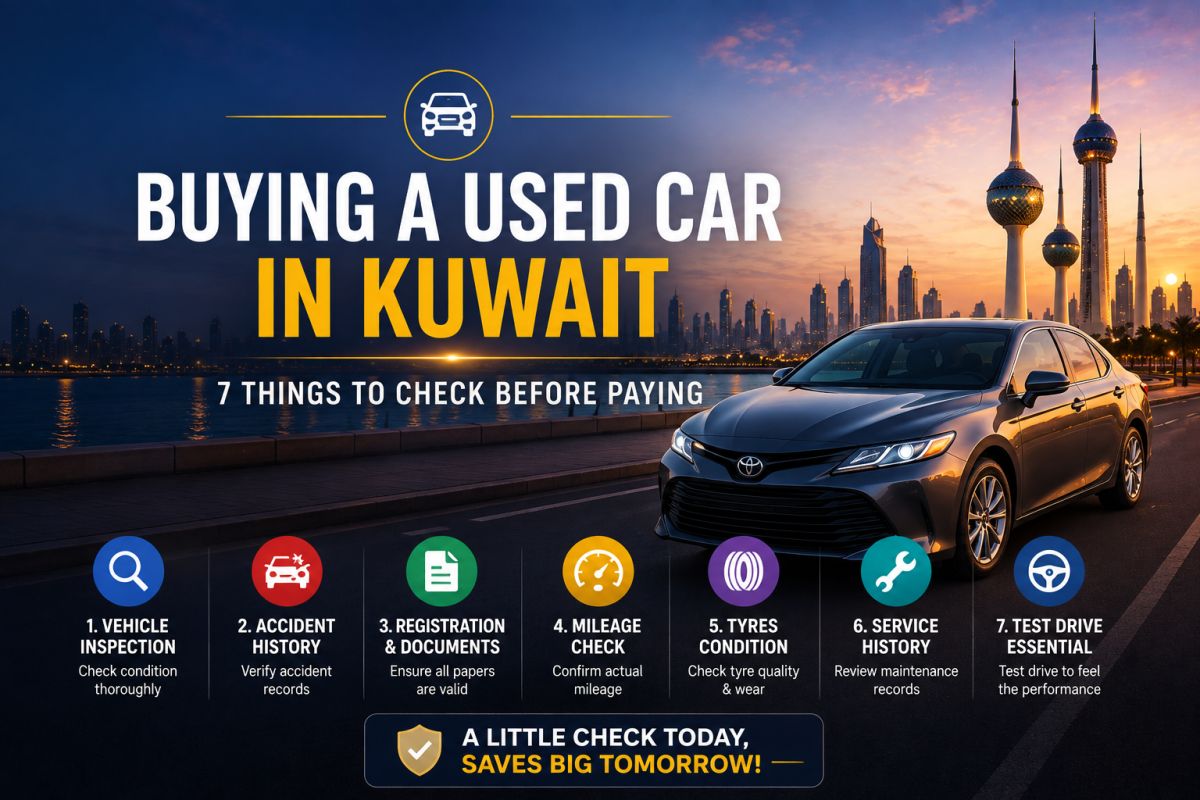
🚗 Buying a Used Car in Kuwait: 7 Things to Check Before Paying
Buying a used car in Kuwait can save a considerable amount of money compared with buying new, but the cheapest-looking deal is not always the cheapest car to own. A few careful checks before payment can protect you from expensive repairs, paperwork problems and a vehicle that becomes difficult to resell later. Here are seven things worth checking before you hand over your money. 1. Check the car's overall condition before discussing the final price Start with the basics. Walk around the vehicle in daylight and look at the body panels from different angles. Uneven paint shades, unusually wide panel gaps, fresh paint on only one part of the vehicle or overspray around rubber seals can indicate previous body repairs. Small cosmetic repairs are not automatically a reason to reject a car. What matters is understanding what happened and whether the repair affected the chassis, airbags, suspension or structural areas. Inside the car, compare the condition of the steering wheel, pedals, seats and switches with the claimed mileage. Heavy wear on a supposedly low-mileage vehicle deserves additional investigation. 2. Do not skip a proper mechanical inspection A short look under the bonnet is not enough. If you are seriously considering the vehicle, have it checked by a workshop or technician you trust. Ask them to examine the engine, transmission, cooling system, suspension, steering, brakes, battery and any visible fluid leaks. Diagnostic scanning can also reveal stored fault codes that may not currently trigger a warning light. A relatively inexpensive pre-purchase inspection can prevent a much larger repair bill after purchase. 3. Check for signs of serious accident or chassis repair Accident history matters because a vehicle can look excellent after bodywork while still having structural issues underneath. Look for welding marks, repaired chassis rails, unusual sealant, misaligned doors, uneven tyre wear and differences between factory welds on the left and right sides. If anything looks suspicious, ask a professional body or chassis specialist to inspect the vehicle. Do not rely only on a seller saying that the car has never had an accident. 4. Test the AC properly — especially in Kuwait Air conditioning is not a minor convenience in Kuwait. Run the AC long enough to confirm that it cools properly, maintains cooling at idle and does not make unusual compressor noises. Test every fan speed and, where applicable, rear AC vents and separate climate zones. An AC system that only feels acceptable during a quick evening test may struggle during peak summer temperatures. 5. Inspect the tyres, brakes and suspension Tyres can immediately add to the cost of a used-car purchase. Check all four tyres for tread depth, cracking, uneven wear and production age. Uneven tyre wear may also point to alignment or suspension problems. During the test drive, listen for suspension knocks and check whether the vehicle pulls to one side. Brake vibration through the steering wheel or pedal can indicate worn or distorted components. Use these upcoming expenses when negotiating the final price. 6. Verify the vehicle documents and seller before paying Make sure the person selling the vehicle has the authority to transfer it. Check the vehicle registration information carefully and make sure the vehicle details correspond with the car you are inspecting. Do not treat ownership transfer as something to sort out days after paying. Payment and transfer should form part of one controlled transaction. 7. Complete payment and ownership transfer safely Kuwait's Ministry of Interior provides vehicle ownership-transfer procedures through the General Department of Traffic, and vehicle ownership transfer is also available digitally through the Sahel government application. In the Sahel process, the seller initiates the transfer, the buyer accepts the request and completes the required insurance step, and the transaction continues through the application until the new electronic vehicle licence becomes available to the buyer. If your transaction requires an in-person procedure or has unusual circumstances, verify the current requirements directly with the Ministry of Interior before paying. A simple rule before buying Try not to become emotionally committed to one particular used car. Kuwait has a large used-car market, and walking away from a questionable vehicle is usually cheaper than repairing a bad purchase later. The best deal is not necessarily the car with the lowest asking price. It is the car whose condition, documentation and total expected ownership cost make sense. Quick used-car checklist • Inspect the body and chassis. • Get a mechanical inspection. • Check for accident repairs. • Test the AC thoroughly. • Inspect tyres, brakes and suspension. • Verify registration and seller details. • Complete payment and ownership transfer safely. Note: Government procedures can change. Always verify the latest vehicle-transfer requirements through Kuwait's Ministry of Interior or the Sahel government application before completing a transaction.
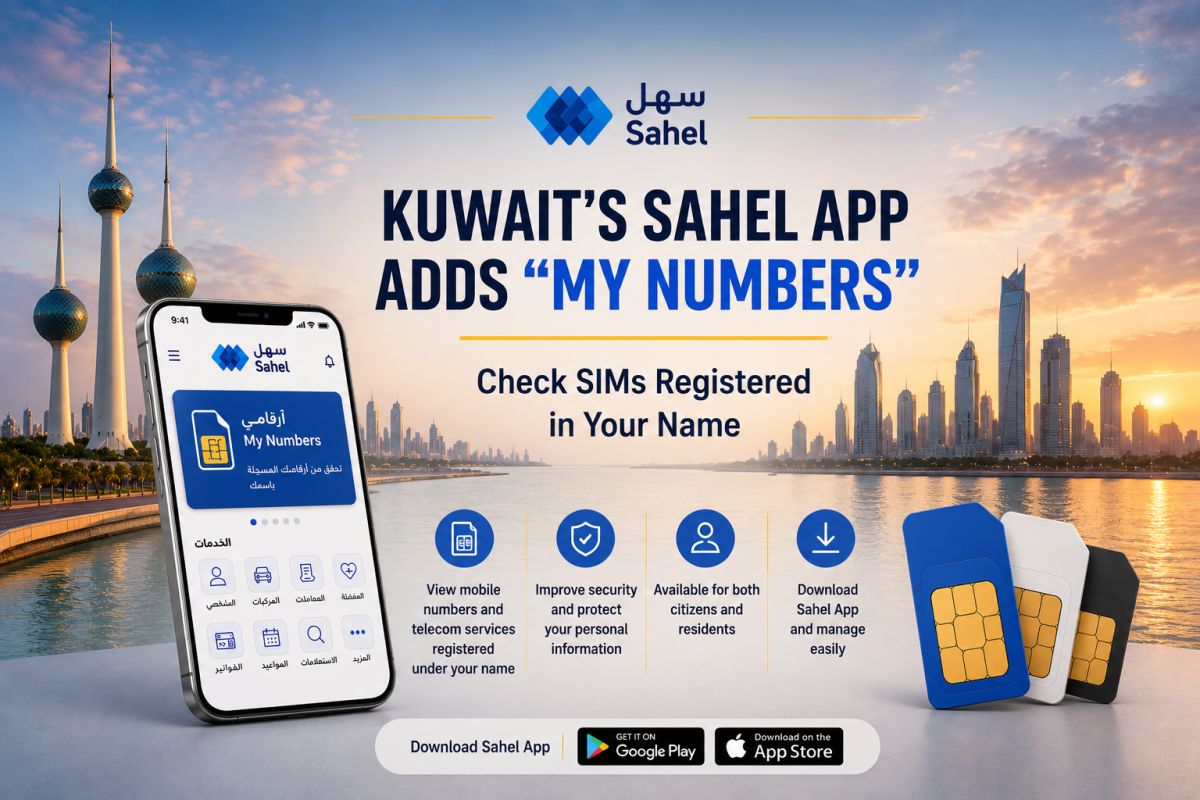
📱 Kuwait’s Sahel App Adds “My Numbers” Feature — Why It Matters
Kuwait has added a useful privacy and security feature to the Sahel government app called “My Numbers” (أرقامي). Launched by the Communication and Information Technology Regulatory Authority (CITRA) in cooperation with Kuwait's telecommunications companies, the service allows citizens and residents to view the mobile numbers and telecommunications services registered under their names. Why should you check it? Most people know which mobile number they currently use, but there may be older, unused or unfamiliar telecom services still registered under their personal information. The new service gives users a central way to review these records rather than simply assuming everything registered under their name is correct. CITRA says the service is intended to improve transparency, help users verify their personal information and strengthen digital privacy. What can “My Numbers” show? Through the service, users can check the telephone lines and telecommunications services registered under their names with different telecom companies in Kuwait. The service is available to both Kuwaiti citizens and residents. If you notice a number or service you don't recognize or no longer use, don't ignore it. Verify it with the relevant telecom operator and ask what action is required. Why this matters for expats in Kuwait For expatriates especially, mobile numbers can accumulate over many years — changing operators, replacing SIM cards or keeping old lines that are no longer actively used. Having one government-linked place to review what is registered under your name makes it easier to spot something unexpected. Zain, which supported the initiative, also highlighted that the service can help users identify unknown or unused lines and take the necessary action. How to check Open the Sahel (سهل) app and look for the My Numbers / أرقامي service. Sahel is Kuwait's official unified government application, providing citizens and residents access to government services, transactions and official notifications from their phones. CITRA recommends that users review the numbers registered under their names to ensure their information is accurate. A small check that could prevent a bigger problem “My Numbers” isn't one of Sahel's flashy features, but it's the kind of service worth checking occasionally. If everything listed belongs to you, you're done. If something unfamiliar appears, you've discovered it early enough to investigate. For Kuwait residents, that makes أرقامي a simple but genuinely useful addition to Sahel.

📱 iPhone 18 Pro Expected This September — Should Kuwait Buyers Wait?
Apple's next major iPhone launch is getting closer, but this year's release could be different from what we're used to. Current reports indicate that Apple is expected to introduce the iPhone 18 Pro and iPhone 18 Pro Max in September 2026, potentially alongside its first foldable iPhone. The regular iPhone 18, however, is reportedly being held until spring 2027. Rumored upgrades for the Pro models include the A20 Pro chip, a smaller Dynamic Island, Apple's next-generation C2 modem and a variable-aperture main camera. These details remain unofficial until Apple announces the devices. For buyers in Kuwait, the interesting question is: if you're planning to buy a new iPhone now, would you buy the current model or wait to see what Apple announces in September? 💬 Are you planning to upgrade this year? That last question is important. MalluPost should invite comments, not just deliver information. I would also use English first, not Malayalam-only. MalluKuwait can have English titles/content with occasional Malayalam-oriented subjects. That keeps it clean and searchable while still clearly serving the Malayali community.
